Invisible Text for WhatsApp (Blank Message & Name)
Invisible Text for WhatsApp
Generate invisible Unicode text for testing in WhatsApp messages, statuses, profiles and other supported text fields.
How to use this WhatsApp invisible text generator
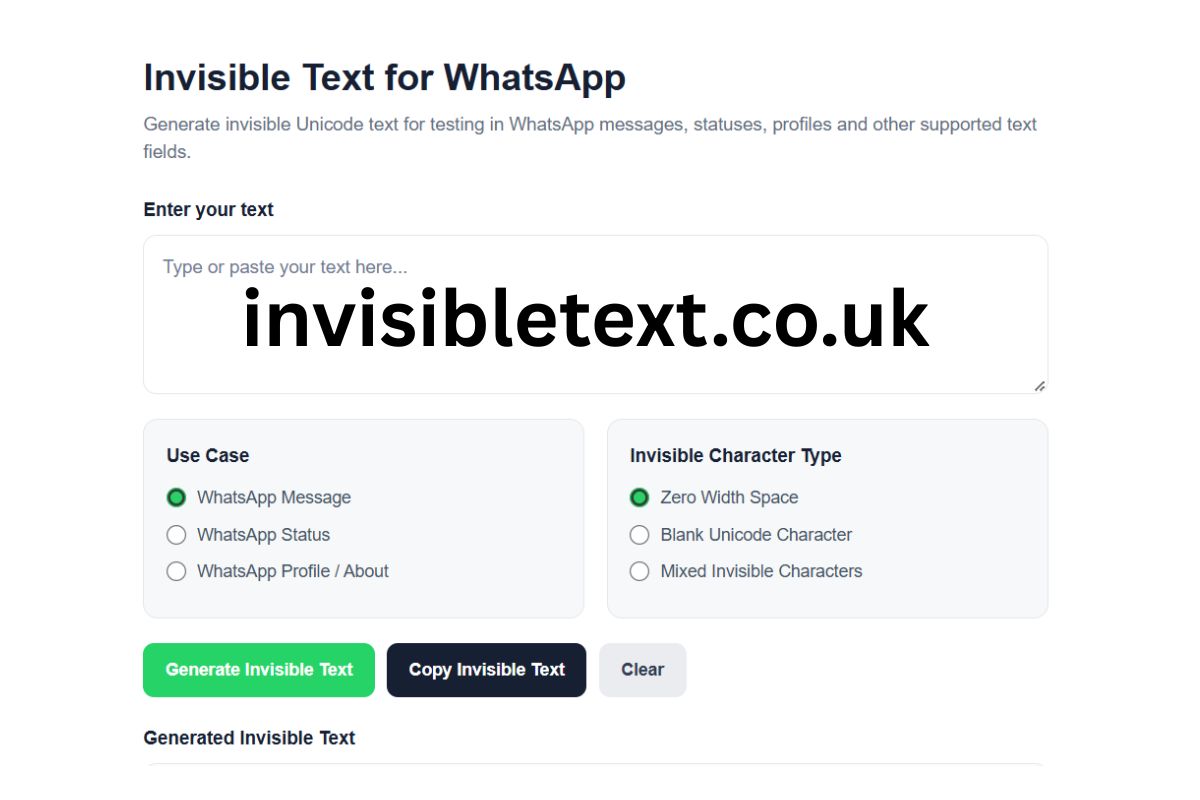
Enter text above, choose an invisible character type, and click “Generate Invisible Text”. Use the Copy button to copy the generated Unicode characters and then test them in the WhatsApp field you want to use. WhatsApp may handle different Unicode characters differently, so always check the final result.
Invisible Text for WhatsApp is text made from Unicode characters that may appear empty or invisible when displayed. Unlike a regular space, invisible Unicode characters can have different technical properties and may be handled differently by WhatsApp, browsers, operating systems, and other applications.
Our free WhatsApp Invisible Text Generator above lets you generate invisible Unicode characters and copy them for testing in supported WhatsApp text fields. You can choose different character types and generate invisible text with just a few clicks.
Important: Invisible characters are not guaranteed to work in every WhatsApp field. WhatsApp may preserve, remove, normalize, or reject certain Unicode characters depending on the app version, device, operating system, and specific text field.
Also Check:- Invisible Text for Steam | Blank Name and Chat Guide
What Is Invisible Text for WhatsApp?
Invisible text is text containing Unicode characters that normally have little or no visible representation on screen. Some examples include Zero Width Space, Zero Width Non-Joiner, Zero Width Joiner, Word Joiner, and other Unicode characters.
These characters are different from an ordinary keyboard space. A normal space is specifically designed to create separation between visible characters, while some invisible Unicode characters have other technical purposes related to text processing, joining, boundaries, and rendering.
When an invisible Unicode character is inserted into a WhatsApp-supported field, it may appear as an empty area even though the underlying text contains actual characters.
How to Use the Invisible Text for WhatsApp Generator
Using the tool is simple:
- Enter or paste your text into the input box.
- Choose where you want to test the text, such as a WhatsApp message, Status, or Profile/About field.
- Select an invisible character type.
- Click Generate Invisible Text.
- Click Copy Invisible Text.
- Paste the generated result into the WhatsApp field you want to test.
- Check the final result after pasting.
Because different WhatsApp environments can process Unicode differently, testing the final result is important.
Invisible Characters Available in the Tool
The generator provides several options for creating invisible Unicode text.
Zero Width Space
A Zero Width Space is a Unicode character that generally does not create a visible gap like a normal space. It is commonly used in text processing and can affect how text boundaries are interpreted.
The tool can generate a sequence of Zero Width Space characters based on the length of your input.
Blank Unicode Character
The tool also provides a blank Unicode character option. These characters may appear empty when displayed, but they are still actual Unicode characters stored in the text.
Their behavior can vary between applications, so the generated result should always be tested in the intended WhatsApp field.
Mixed Invisible Characters
The mixed option combines several invisible Unicode characters instead of repeatedly using only one character.
This can be useful when you want to test how different Unicode character types behave in a particular WhatsApp environment.
Invisible Text vs Normal Space
An invisible Unicode character is not necessarily the same thing as a normal space.
A standard space is designed to separate words and create spacing in normal text layout. Invisible Unicode characters have their own Unicode definitions and can perform different technical functions.
For example, a Zero Width Space normally does not create the same visible gap as an ordinary space.
Other Unicode characters can affect text joining, word boundaries, or rendering.
This is why the term "invisible character" is broad. It does not refer to one single Unicode character.
Does Invisible Text Actually Contain Characters?
Yes. Text that looks empty does not necessarily mean that there is nothing inside it.
For example, a text field may visually appear blank while still containing Unicode code points. Software can potentially inspect the underlying text and determine that characters are present.
This is an important distinction between visually invisible text and empty text.
The WhatsApp invisible text generator creates actual Unicode characters. It does not create an empty value.
Invisible Text for WhatsApp Messages
WhatsApp messages are one of the most common places where users may want to test Unicode characters.
You can generate the text using the tool above, copy the result, and paste it into a WhatsApp conversation.
However, WhatsApp can process text differently depending on its current implementation. A character that appears invisible in one environment may not behave exactly the same way in another.
For this reason, always check the message after pasting.
Also Check:- Invisible Text for Facebook: Name, Bio & Comments
Invisible Text for WhatsApp Status
WhatsApp Status is another text area where Unicode behavior can be tested.
If you are experimenting with invisible characters in a Status, generate the text above and paste it into the relevant Status field.
The appearance and acceptance of Unicode characters can depend on the WhatsApp application version, device, keyboard, and operating system.
The generator does not guarantee that a particular invisible character will remain unchanged after it is pasted.
Invisible Characters for WhatsApp Profile and About
WhatsApp profile-related fields, including the About section, may have their own character-handling rules.
You can select WhatsApp Profile / About in the tool to indicate where you intend to test the generated text.
Keep in mind that a field may have character limits, formatting rules, or Unicode normalization behavior. Always verify the final result rather than assuming that every invisible Unicode character will be preserved.
Why Does Invisible Text Sometimes Stop Working?
There are several reasons an invisible character may not behave as expected.
WhatsApp Updates
Applications can change how they process Unicode characters. A character that worked previously may behave differently after an update.
Different Devices
Android, iPhone, Windows, macOS, and other environments can render or process Unicode differently.
Different Text Fields
A WhatsApp message, Status, and profile-related field may not necessarily handle the same characters in exactly the same way.
Unicode Normalization
Some software processes Unicode text before displaying or storing it. During this process, characters can potentially be transformed or removed.
Character Filtering
A platform may remove characters that it does not support or consider appropriate for a particular field.
Because of these factors, there is no universal guarantee that every invisible character will work everywhere.
Is Invisible Text the Same as Blank Text?
Not exactly.
Blank text generally describes something that appears empty to the user. Invisible text can refer to text containing Unicode characters that have no obvious visible representation.
A blank-looking result may therefore contain one or more Unicode characters.
This distinction is particularly important when using tools that generate invisible characters because copying an apparently empty result can still place actual characters on the clipboard.
Is Invisible Text Safe to Use?
Invisible Unicode characters are part of the Unicode standard, but their appropriate use depends on the context.
For normal experimentation, formatting, Unicode testing, and understanding how different applications handle text, the generator can be useful.
However, invisible characters should not be used to impersonate people, evade platform restrictions, deceive users, or bypass moderation or security controls.
Always follow WhatsApp's applicable rules and use generated text responsibly.
Can Invisible WhatsApp Text Be Detected?
Visually invisible does not mean technically undetectable.
Software can inspect the underlying Unicode code points in a string. Developers, text-processing systems, and other software can potentially identify invisible characters even when they cannot be seen normally.
Therefore, the term invisible text describes its visual appearance rather than guaranteeing that the characters cannot be detected by software.
Why Use Our WhatsApp Invisible Text Generator?
The tool above provides a simple way to experiment with different invisible Unicode characters without manually searching for individual Unicode code points.
It includes:
- Free invisible text generation
- Zero Width Space
- Blank Unicode characters
- Mixed invisible characters
- WhatsApp message testing
- WhatsApp Status testing
- WhatsApp Profile/About testing
- One-click copy
- Character counter
- Mobile-friendly interface
- No software installation required
You can enter your text, select an option, generate the result, and copy it directly from the browser.
Frequently Asked Questions
What is invisible text for WhatsApp?
Invisible text for WhatsApp is text containing Unicode characters that may have little or no visible appearance. These characters are still part of the underlying text.
How do I create invisible text for WhatsApp?
Enter your text into the generator above, select an invisible character type, click Generate Invisible Text, and then use the Copy button.
Is invisible text the same as a space?
No. A normal space and an invisible Unicode character can have different Unicode definitions and technical behavior.
Does invisible text work on WhatsApp?
It may work in some WhatsApp fields and environments, but behavior can vary. WhatsApp may preserve, remove, normalize, display, or reject particular Unicode characters.
Can I use invisible characters in WhatsApp Status?
You can test them in WhatsApp Status, but acceptance and rendering depend on the specific WhatsApp version and device.
Can invisible Unicode characters be detected?
Yes. Although they may be visually invisible, software can inspect the underlying Unicode characters.
Is the WhatsApp invisible text generator free?
Yes. The tool above can be used directly in your browser without installing additional software.
Final Thoughts
The Invisible Text for WhatsApp Generator provides a convenient way to experiment with Unicode characters that may appear invisible in supported text fields. You can test Zero Width Space, blank Unicode characters, and mixed invisible characters for WhatsApp messages, Status, and Profile/About fields.
Remember that invisible Unicode behavior is not universal. Different WhatsApp versions, devices, operating systems, browsers, and text fields can process the same character differently.
For the most reliable results, generate your invisible text above, copy it, paste it into the intended WhatsApp field, and verify the final result before using it.